


TypeScript in a nutshell
A list of the most frequent questions someone wants to know about TypeScript.
What is TypeScript?
TypeScript adds support for strongly typed programming in your JavaScript applications. It’s tightly integrated with your text editor, to help you catch your errors early.
TypeScript is a superset of JavaScript. All existing features of JS are already supported, but it adds syntax, which helps you build much more structured applications.
TypeScript’s compiler transpiles to JavaScript. This means that you can run all the applications on every browser, on Node.js or other native apps that have a built-in JavaScript compiler. You have plenty of options to set the target supported devices.
Type checking runs on compile-time. If you violate the type rules, your application will not run due to errors. All the extra code that you add will be removed from the transpiled JS code and it will not be available at runtime.
What are the benefits of using TypeScript?
By introducing types to your code, your editor can understand much better how the different parts of your application are interconnected. Therefore, it can provide you with sophisticated auto-completion suggestions that can speed up your development.
How to migrate an existing JavaScript project into TypeScript?
You can adopt TypeScript gradually into your existing projects. You can also use it to catch JavaScript errors in your continuous integration pipelines. In fact, Visual Studio Code has TypeScript built-in, to help you find errors without any configuration from your side.
Everyday types
Learning TypeScript from scratch? Here’s a curated list with all the popular types.
Literal
let title: string = 'Bohemian Rhapsody'
let releasedAt: number = 1975
let gernes: string[] = ['Rock', 'Hard rock', 'Progressive rock']
let isFavorite: boolean = true
Object literal
type Track = {
  id: number
  artist: string
  title: string
}
Nullables
let error: undefined // similar to JS
let loading: null // similar to JS
Wildcards
When you use any in your type annotations, you simply skip the type annotations. You are basically saying “I hate TypeScript and I don’t want to deal with it. You deal with it!“.
let year: any = 2020
year = '2021' // it perfectly compiles without issues.
When you’re dealing with a value that has an unpredictable type, use unknown instead of any:
let duration: unknown
let durationInMinutes: string
duration = '5.54m'
durationInMinutes = duration // Doesn't compile since unknown can be anything!
The never keyword can play the role of the type guard. We can’t assign any type of value to a variable with the type never, except for values that are themselves type of never.
function throwError(message: string): **never** {
  throw new Error(message);
}
Literal
type On = 'on'Union
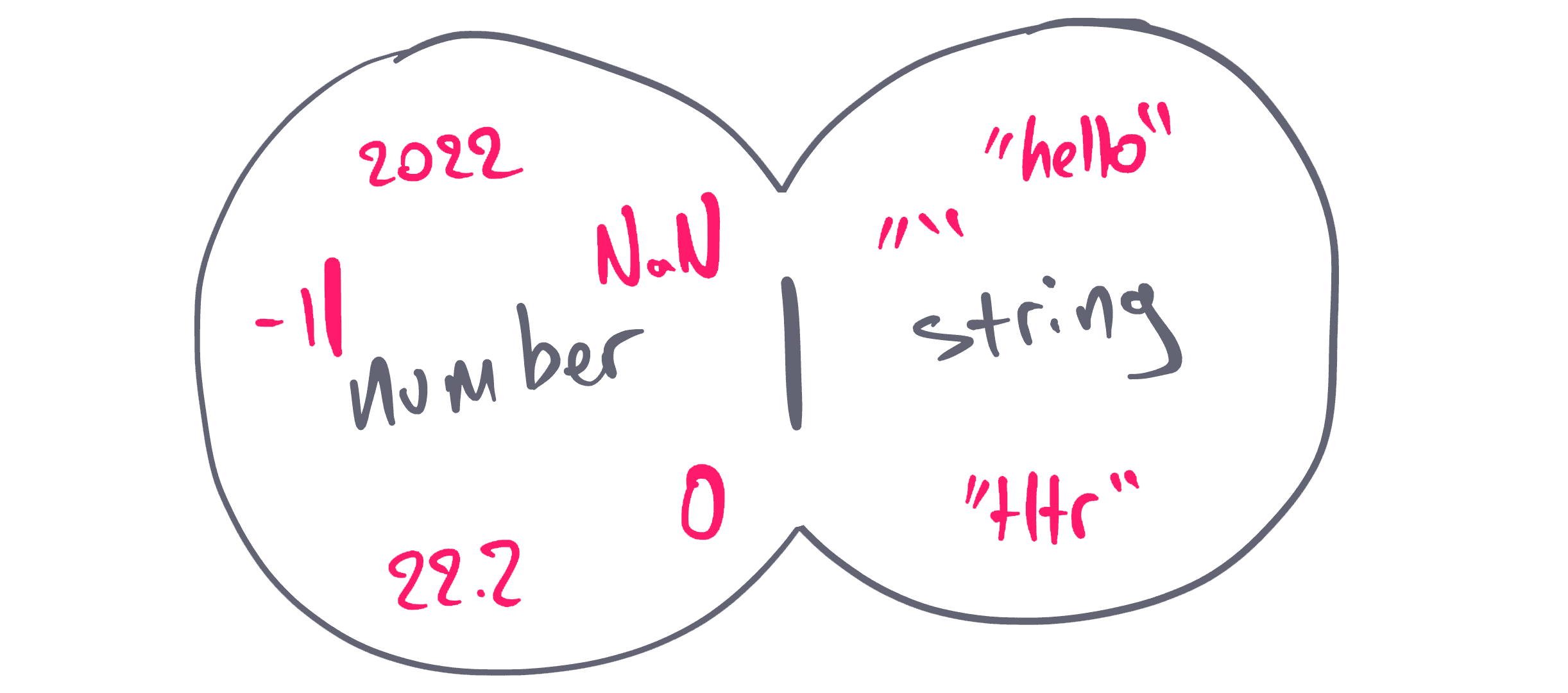
An array of types:
let id: string | undefined
let status: 'open' | 'in progress' | 'resolved'
Template literal

type SizeValue = `${number}${'%' | 'em' | 'rem' | 'px' | 'vw' | 'vh'}`Intersection
type User = Id & {
  username: string
  email: string
}

type Order = Id & {
  total: number
}

const userWithOrder: User & Order = {
  id: 'U-123',
  total: 123,
  username: 'nicotsou',
  email: 'no@spam.please',
}
Enum
enum Filetypes {
  Mp3,
  Mp4,
  Wav,
}

const fileType = Filetypes.Mp3
TypeScript compares their actual values:
enum Filetypes {
  Mp3 = 20,
  Wav = 2,
}

Filetypes.Mp3 < Filetypes.Wav // returns false
Rarely used, but they can be really helpful in certain situations.
Advanced types
Tuple
type Coordinates = [lat: number, long: number]Lookup types
type Data = Response['body']keyof
type ArtistKey = keyof Artist // "type" | "id" | "name" | "followed" | "plays"
type StringKey = keyof string // all members of the string object like: "toString" | "charAt" | "charCodeAt" | etc...
type UndefinedKey = keyof undefined // never
infer
By using the infer keyword, you are creating a new generic type R, which then can be returned as a type value. So basically, you are catching the type of the generic Promise<T>. This can become really useful, when you are developing your APIs.
type PromiseReturnType<T> = T extends Promise<infer R> ? R : TDiscriminated unions
Consider the following types:
type FileBase = {
  filename: string
  type: string
}
type Song = FileBase & {
  type: 'mp3'
  play: () => void
}
type VideoClip = FileBase & {
  type: 'mp4'
  play: () => void
}
type CoverArt = FileBase & {
  type: 'png'
  move: () => void
}
type Receipt = FileBase & {
  type: 'pdf'
  download: () => void
}
First off, you combine all file types under one umbrella:
type PlayerFiles = Song | VideoClip | CoverArt | ReceiptThen, we try to implement the following function
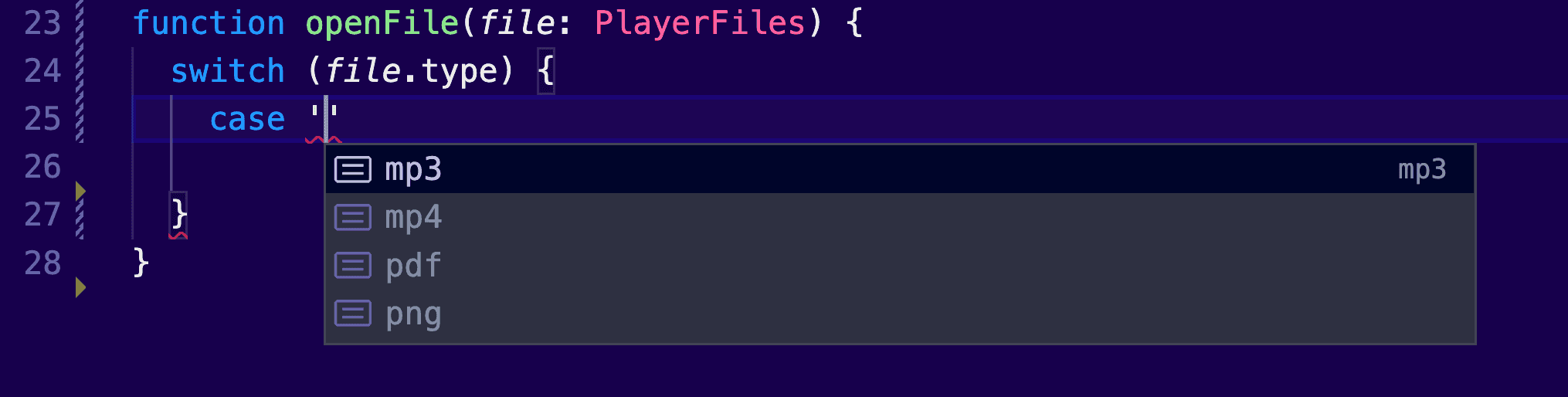
function openFile(file: PlayerFiles) {
  switch (file.type) {
    case ...
	}
}
The moment we start typing our case block, autocompletion kicks in:
Functions
Arguments
function add(a: number = 0, b: number = 0): number {
  return a + b;
Arrow functions
const add = (a: number, b: number): number => a + bVoid
function init(): void {} // This function should not return any valueOverloading
// overload signatures
function search(title: string): Track[]
function search(id: number): Track[]
// actual implementation
function search(nameOrId: string | number): Track[] {
  if (typeof nameOrId === 'number') {
    console.log('searching by id')
  }
  if (typeof nameOrId === 'string') {
    console.log('searching by name')
  }
  return []
}
Code structure
Type alias
type Track =
  | undefined
  | {
      title: string
      releasedAt: number
      gernes: string[]
      isFavorite: boolean
    }
Key characteristics:
- A TypeScript-only feature, therefore only available at compilation.
- They can support primitive types.
- They can only be declared once (unless exported).
Interface
interface ITrack {
  title: string
  releasedAt: number
  gernes: string[]
  isFavorite: boolean
}
Key characteristics:
- A TypeScript-only feature, therefore only available at compilation.
- Act as object type annotations for object structures.
- Can connect unrelated classes together.
- Can’t support primitive types, only object structures.
- Can only be declared once (unless exported).
- Can be extended.
Class
class TrackClass {
  title: string
  releasedAt: number
  gernes: string[]
  isFavorite: boolean

  constructor(
    title: string,
    releasedAt: number,
    gernes: string[],
    isFavorite: boolean
  ) {
    this.title = title
    this.releasedAt = releasedAt
    this.gernes = gernes
    this.isFavorite = isFavorite
  }
}
Key characteristics:
- This is a JavaScript feature, and therefore it’s available at runtime.
- They are meant to instantiate objects by encapsulating their logic.
- Can’t support primitive types, only object structures.
- Full support for object-oriented features.
Dynamic types
Wouldn’t it be great if you could program your types similar to how you program your applications? Here are some core TypeScript features that will help you create types dynamically.
Generics
A function but for types:
interface IPlaylist<T> {
  items: T[]

  addToPlaylist(newItem: T): void
  removeFromPlaylist(itemToRemove: T): void
}
Conditional types
Conditional types allow you to add logic to your types. As a result, you can reuse existing types, by reducing the boilerplate of having multiple types for every use case.
type Playable<T> = T extends { play: () => void } ? T : neverMapped types
Allows you to loop over your types and create new ones:
type ReadonlyUser = { readonly [Key in keyof User]: User[Key] }Additional Resources
You can check out the following:
- The official TypeScript cheat sheets are in a PDF format, and they may contain some more information.
- The React TypeScript Cheatsheets website is the missing manual for implementing React apps with TypeScript.
This is still work in progress. I’m planning to add more sections as I’m adding content to my course. Do you have anything else in mind you want to suggest? Just send me a DM on X.